

One of the benefits of using the online method with ZDM for OCI migration is its ability to allow you to prepare everything upfront, and minimize the number of actions needed on the migration day. It also ensures that everything is running smoothly until the migration day. This means that you can, for example, let ZDM run all the preparation steps, and 10 days later, you can perform the migration.
When using the Logical Online migration method with ZDM, Oracle GoldenGate ensures replication between the source and the target database under the hood. But it happens that manual or applicative actions on the source or on the target database unfortunately break the GoldenGate replication …
Read more: ZDM hints and tips: Logical online method – 3 ways to check the status of a GoldenGate replicat processAfter launching a logical online migration using ZDM, a healthy job status would be similar to:
# zdmcli query job -jobid 77
zdm-server.subnet1.labvcn.oraclevcn.com: Audit ID: 2136
Job ID: 77
User: zdmuser
Client: zdm-server
Job Type: "MIGRATE"
[...]
Current status: PAUSED
Current Phase: "ZDM_MONITOR_GG_LAG"
Result file path: "/u01/app/zdmbase214/chkbase/scheduled/job-77-2023-11-22-13:40:21.log"
Metrics file path: "/u01/app/zdmbase214/chkbase/scheduled/job-77-2023-11-22-13:40:21.json"
Excluded objects file path: "/u01/app/zdmbase214/chkbase/scheduled/job-77-filtered-objects-2023-11-22T13:40:32.108.json"
Job execution start time: 2023-11-22 13:40:21
Job execution end time: 2023-11-22 13:53:21
Job execution elapsed time: 11 minutes 28 seconds
ZDM_VALIDATE_TGT ...................... COMPLETED
ZDM_VALIDATE_SRC ...................... COMPLETED
ZDM_SETUP_SRC ......................... COMPLETED
ZDM_PRE_MIGRATION_ADVISOR ............. COMPLETED
ZDM_VALIDATE_GG_HUB ................... COMPLETED
ZDM_VALIDATE_DATAPUMP_SETTINGS_SRC .... COMPLETED
ZDM_VALIDATE_DATAPUMP_SETTINGS_TGT .... COMPLETED
ZDM_PREPARE_DATAPUMP_SRC .............. COMPLETED
ZDM_DATAPUMP_ESTIMATE_SRC ............. COMPLETED
ZDM_PREPARE_GG_HUB .................... COMPLETED
ZDM_ADD_HEARTBEAT_SRC ................. COMPLETED
ZDM_ADD_SCHEMA_TRANDATA_SRC ........... COMPLETED
ZDM_CREATE_GG_EXTRACT_SRC ............. COMPLETED
ZDM_PREPARE_DATAPUMP_TGT .............. COMPLETED
ZDM_DATAPUMP_EXPORT_SRC ............... COMPLETED
ZDM_UPLOAD_DUMPS_SRC .................. COMPLETED
ZDM_DATAPUMP_IMPORT_TGT ............... COMPLETED
ZDM_POST_DATAPUMP_SRC ................. COMPLETED
ZDM_POST_DATAPUMP_TGT ................. COMPLETED
ZDM_ADD_HEARTBEAT_TGT ................. COMPLETED
ZDM_ADD_CHECKPOINT_TGT ................ COMPLETED
ZDM_CREATE_GG_REPLICAT_TGT ............ COMPLETED
ZDM_START_GG_REPLICAT_TGT ............. COMPLETED
ZDM_MONITOR_GG_LAG .................... COMPLETED
ZDM_PREPARE_SWITCHOVER_APP ............ PENDING
ZDM_SWITCHOVER_APP .................... PENDING
ZDM_POST_SWITCHOVER_TGT ............... PENDING
ZDM_RM_GG_EXTRACT_SRC ................. PENDING
ZDM_RM_GG_REPLICAT_TGT ................ PENDING
ZDM_DELETE_SCHEMA_TRANDATA_SRC ........ PENDING
ZDM_RM_HEARTBEAT_SRC .................. PENDING
ZDM_RM_CHECKPOINT_TGT ................. PENDING
ZDM_RM_HEARTBEAT_TGT .................. PENDING
ZDM_CLEAN_GG_HUB ...................... PENDING
ZDM_POST_ACTIONS ...................... PENDING
ZDM_CLEANUP_SRC ....................... PENDING

Pause After Phase: "ZDM_MONITOR_GG_LAG"
Let’s now create a scenario to break things a little bit … There is a table on the source called bands.labels with a primary key constraint on the column id. Let’s insert a new row in this table, but directly on the target database, while GoldenGate replication is running:
SQL> select * from bands.labels;

   ID            NAME_LONG    CREATION_DATE
_____ ____________________ ________________
6     METAL_MUSIC_LABEL    22-NOV-23

SQL> insert into bands.labels (ID,NAME_LONG) values ('7','SLUDGE_METAL_MUSIC_LABEL');

1 row inserted.

SQL> commit ;

Commit complete.

SQL> select * from bands.labels;

   ID                   NAME_LONG    CREATION_DATE
_____ ___________________________ ________________
6     METAL_MUSIC_LABEL           22-NOV-23
7     SLUDGE_METAL_MUSIC_LABEL    22-NOV-23
Now, let’s insert the same row on the source database:
SQL> insert into bands.labels (ID,NAME_LONG) values ('7','SLUDGE_METAL_MUSIC_LABEL');

1 row inserted.

SQL> commit ;

Commit complete.

SQL> select * from bands.labels;

   ID                   NAME_LONG    CREATION_DATE
_____ ___________________________ ________________
6     METAL_MUSIC_LABEL           22-NOV-23
7     SLUDGE_METAL_MUSIC_LABEL    22-NOV-23
No SQL error until now … Except that the GoldenGate replicat process will try to insert this row again on the target database, and it will, of course, fail, because of the primary key constraint violation. When we resume the ZDM job, we get the following:
# zdmcli resume job -jobid 77 -pauseafter ZDM_PREPARE_SWITCHOVER_APP
zdm-server.subnet1.labvcn.oraclevcn.com: Audit ID: 2141

# zdmcli query job -jobid 77
zdm-server.subnet1.labvcn.oraclevcn.com: Audit ID: 2143
Job ID: 77
User: zdmuser
Client: zdm-server
Job Type: "MIGRATE"
[...]
Current status: FAILED
Result file path: "/u01/app/zdmbase214/chkbase/scheduled/job-77-2023-11-22-13:40:21.log"
Metrics file path: "/u01/app/zdmbase214/chkbase/scheduled/job-77-2023-11-22-13:40:21.json"
Excluded objects file path: "/u01/app/zdmbase214/chkbase/scheduled/job-77-filtered-objects-2023-11-22T13:40:32.108.json"
Job execution start time: 2023-11-22 13:40:21
Job execution end time: 2023-11-22 14:05:53
Job execution elapsed time: 12 minutes 30 seconds
ZDM_VALIDATE_TGT ...................... COMPLETED
ZDM_VALIDATE_SRC ...................... COMPLETED
ZDM_SETUP_SRC ......................... COMPLETED
ZDM_PRE_MIGRATION_ADVISOR ............. COMPLETED
ZDM_VALIDATE_GG_HUB ................... COMPLETED
ZDM_VALIDATE_DATAPUMP_SETTINGS_SRC .... COMPLETED
ZDM_VALIDATE_DATAPUMP_SETTINGS_TGT .... COMPLETED
ZDM_PREPARE_DATAPUMP_SRC .............. COMPLETED
ZDM_DATAPUMP_ESTIMATE_SRC ............. COMPLETED
ZDM_PREPARE_GG_HUB .................... COMPLETED
ZDM_ADD_HEARTBEAT_SRC ................. COMPLETED
ZDM_ADD_SCHEMA_TRANDATA_SRC ........... COMPLETED
ZDM_CREATE_GG_EXTRACT_SRC ............. COMPLETED
ZDM_PREPARE_DATAPUMP_TGT .............. COMPLETED
ZDM_DATAPUMP_EXPORT_SRC ............... COMPLETED
ZDM_UPLOAD_DUMPS_SRC .................. COMPLETED
ZDM_DATAPUMP_IMPORT_TGT ............... COMPLETED
ZDM_POST_DATAPUMP_SRC ................. COMPLETED
ZDM_POST_DATAPUMP_TGT ................. COMPLETED
ZDM_ADD_HEARTBEAT_TGT ................. COMPLETED
ZDM_ADD_CHECKPOINT_TGT ................ COMPLETED
ZDM_CREATE_GG_REPLICAT_TGT ............ COMPLETED
ZDM_START_GG_REPLICAT_TGT ............. COMPLETED
ZDM_MONITOR_GG_LAG .................... COMPLETED
ZDM_PREPARE_SWITCHOVER_APP ............ FAILED
ZDM_SWITCHOVER_APP .................... PENDING
ZDM_POST_SWITCHOVER_TGT ............... PENDING
ZDM_RM_GG_EXTRACT_SRC ................. PENDING
ZDM_RM_GG_REPLICAT_TGT ................ PENDING
ZDM_DELETE_SCHEMA_TRANDATA_SRC ........ PENDING
ZDM_RM_HEARTBEAT_SRC .................. PENDING
ZDM_RM_CHECKPOINT_TGT ................. PENDING
ZDM_RM_HEARTBEAT_TGT .................. PENDING
ZDM_CLEAN_GG_HUB ...................... PENDING
ZDM_POST_ACTIONS ...................... PENDING
ZDM_CLEANUP_SRC ....................... PENDING

Pause After Phase: "ZDM_PREPARE_SWITCHOVER_APP"
ZDM job log file
The ZDM job log file will immediately show that the replicat process is ABENDED and will show the error log. Actually, it will display the content of the replicat report file, exactly like on the GoldenGate web user interface:
####################################################################
zdm-server: 2023-11-22T14:04:51.750Z : Resuming zero downtime migrate operation ...
[...]
zdm-server: 2023-11-22T14:05:53.688Z : Status of Oracle GoldenGate replicat process "R95UB" : ABENDED
zdm-server: 2023-11-22T14:05:53.688Z : "R95UB" is processing trail file "Vu" with sequence number "0" at offset "17817"
PRGG-1049 : Oracle GoldenGate process "R95UB" has "ABENDED".
[...]
2023-11-22 14:05:05  WARNING OGG-01154  SQL error 1 mapping source table BANDS.LABELS to target table CHINOOK.BANDS.LABELS. Database error: OCI Error ORA-00001: unique constraint (BANDS.LABELS_PK) violated (status = 1), SQL <INSERT INTO "BANDS"."LABELS" ("ID","NAME_LONG","CREATION_DATE") VALUES (:a0,:a1,:a2)>.
[...]
2023-11-22 14:05:07  ERROR   OGG-01668  PROCESS ABENDING.
GoldenGate hub web user interface
To access this file in a slightly more readable way, connect to the GoldenGate hub web user interface using your favorite browser. You can get the GoldenGate hub URL from your response file:
# grep GOLDENGATEHUB_URL <your_response_file>.rsp
GOLDENGATEHUB_URL=https://<FQDN or IP address of server hosting GoldenGatedeployment>
If you created your GoldenGate hub using OCI Marketplace, the username and password are available on your GoldenGate hub compute instance in the following file:
$ cat /home/opc/ogg-credentials.json
{"username": "<your_username>", "credential": "<your_strong_password>"}
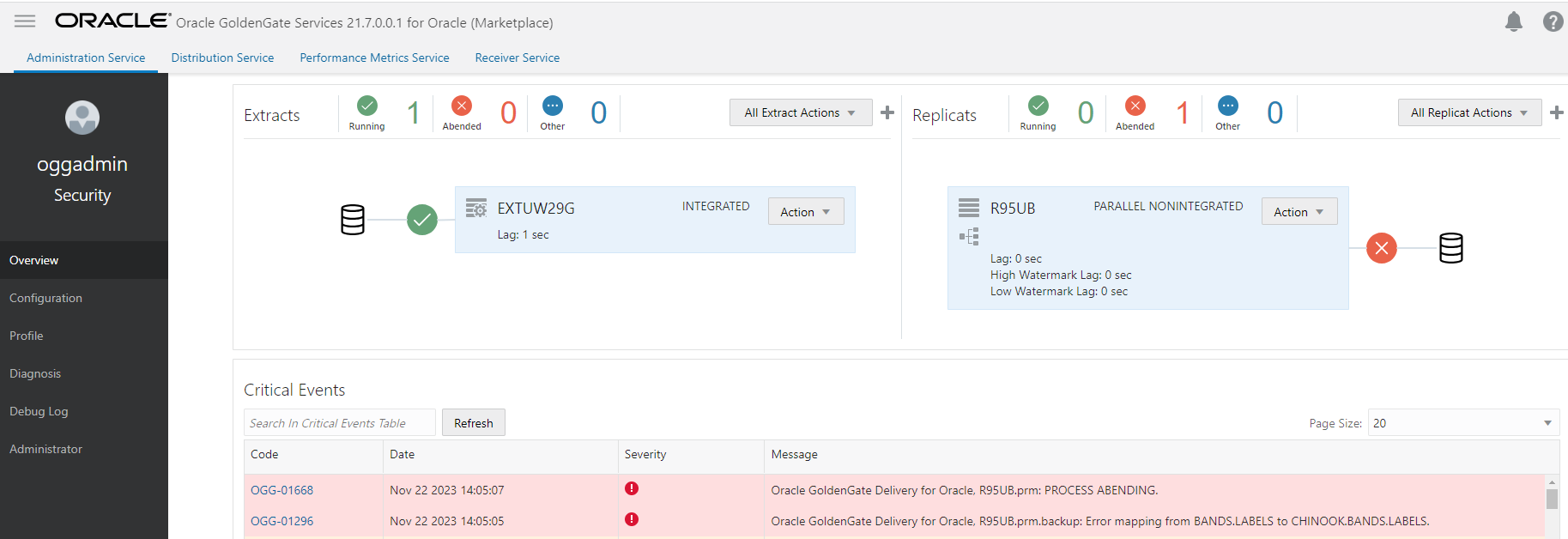
Once connected, identify your faulty replicat process and click Action > Details > Report. You will get something like:
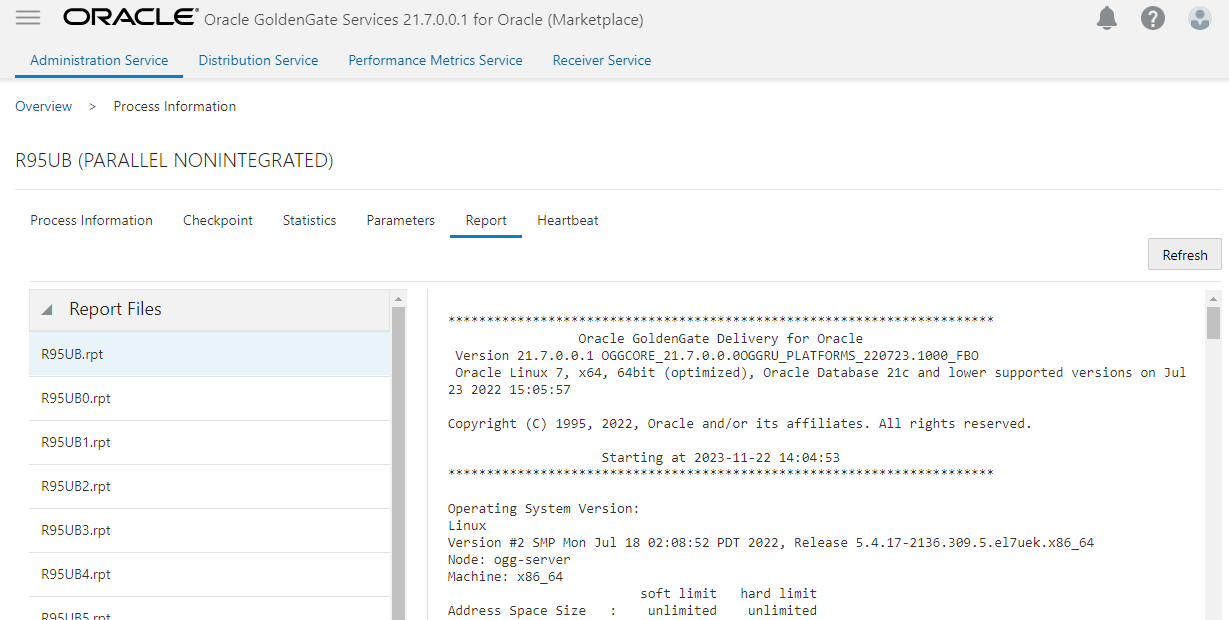
In the same way, you can see the status and understand why the replicat process abended.
GoldenGate REST APIs
And to finish, my favorite way to dig for more information is to use the GoldenGate REST APIs. It is pretty straightforward, thanks to the documentation:
List all the replicats
$ curl -k -u oggadmin -X GET https://<your_ogg_hub>/services/v2/replicats | jq

{
  "$schema": "api:standardResponse",
  [...]
  "messages": [],
  "response": {
    "$schema": "ogg:collection",
    "items": [
      {
        "links": [
          {
            "rel": "parent",
            "href": "https://<your_ogg_hub>/services/v2/replicats",
            "mediaType": "application/json"
          },
          {
            "rel": "canonical",
            "href": "https://<your_ogg_hub>/services/v2/replicats/R95UB",
            "mediaType": "application/json"
          }
        ],
        "$schema": "ogg:collectionItem",
        "name": "R95UB"
      }
    ]
  }
}
Retrieve the status of a specific replicat
$ curl -k -u oggadmin -X GET https://<your_ogg_hub>/services/v2/replicats/R95UB/info/status | jq

{
  "$schema": "api:standardResponse",
  [...]
  "messages": [],
  "response": {
    "$schema": "ogg:replicatStatus",
    "status": "abended",
    "lastStarted": "2023-11-22T14:04:54.287Z",
    "lag": 603,
    "sinceLagReported": 1583,
    "position": {
      "path": "/u02/trails/",
      "name": "Vu",
      "sequence": 0,
      "offset": 17817
    }
  }
}
List the reports of this specific replicat
$ curl -k -u oggadmin -X GET https://<your_ogg_hub>/services/v2/replicats/R95UB/info/reports | jq

{
  "$schema": "api:standardResponse",
  [...]
  "messages": [],
  "response": {
    "$schema": "ogg:collection",
    "items": [
      {
        "links": [
          {
            "rel": "parent",
            "href": "https://<your_ogg_hub>/services/v2/replicats/R95UB/info/reports",
            "mediaType": "application/json"
          },
          {
            "rel": "canonical",
            "href": "https://<your_ogg_hub>/services/v2/replicats/R95UB/info/reports/R95UB.dsc",
            "mediaType": "application/json"
          }
        ],
        "$schema": "ogg:collectionItem",
        "name": "R95UB.dsc"
      },
      {
        "links": [
          {
            "rel": "parent",
            "href": "https://<your_ogg_hub>/services/v2/replicats/R95UB/info/reports",
            "mediaType": "application/json"
          },
          {
            "rel": "canonical",
            "href": "https://<your_ogg_hub>/services/v2/replicats/R95UB/info/reports/R95UB.rpt",
            "mediaType": "application/json"
          }
        ],
        "$schema": "ogg:collectionItem",
        "name": "R95UB.rpt"
      },
  [...]
    ]
  }
}
Retrieve a specific report
$ curl -k -u oggadmin -X GET https://<your_ogg_hub>/services/v2/replicats/R95UB/info/reports/R95UB.rpt | jq

{
  "$schema": "api:standardResponse",
  [...]
  "messages": [],
  "response": {
    "lines": [
      "",
      "***********************************************************************",
      "                 Oracle GoldenGate Delivery for Oracle",
      " Version 21.7.0.0.1 OGGCORE_21.7.0.0.0OGGRU_PLATFORMS_220723.1000_FBO",
      " Oracle Linux 7, x64, 64bit (optimized), Oracle Database 21c and lower supported versions on Jul 23 2022 15:05:57",
      " ",
      "Copyright (C) 1995, 2022, Oracle and/or its affiliates. All rights reserved.",
      "",
      "                    Starting at 2023-11-22 14:04:53",
      "***********************************************************************",
      "",
      "Operating System Version:",
      "Linux",
      "Version #2 SMP Mon Jul 18 02:08:52 PDT 2022, Release 5.4.17-2136.309.5.el7uek.x86_64",
      "Node: ogg-server",
      "Machine: x86_64",
      "                         soft limit   hard limit",
      "Address Space Size   :    unlimited    unlimited",
      "Heap Size            :    unlimited    unlimited",
      "File Size            :    unlimited    unlimited",
      "CPU Time             :    unlimited    unlimited",
      "",
      "Process id: 4528",
      "",
      "Description: ",
      "",
      "***********************************************************************",
      "**            Running with the following parameters                  **",
      "***********************************************************************",
      "",
      "2023-11-22 14:04:53  INFO    OGG-03059  Operating system character set identified as UTF-8.",
      "",
        [...]
      "2023-11-22 14:05:05  WARNING OGG-01154  SQL error 1 mapping source table BANDS.LABELS to target tableCHINOOK.BANDS.LABELS. Database error: OCI Error ORA-00001: unique constraint (BANDS.LABELS_PK) violated (status = 1), SQL <INSERT INTO \"BANDS\".\"LABELS\" (\"ID\",\"NAME_LONG\",\"CREATION_DATE\") VALUES (:a0,:a1,:a2)>.",
  [...]
    ],
    "$schema": "ogg:report"
  }
}
Whether you are examining ZDM job logs, browsing the GoldenGate hub web interface, or using the GoldenGate REST APIs, I hope this article will help you find what suits you best in these different approaches for troubleshooting issues with the replicat process when using ZDM.
 Floo Bar